
A practitioner's guide for event planners, production teams and AV partners: how simultaneous interpretation produced by remote interpreters reaches an in-room audience listening on translation headsets — three methods, honestly compared.
----------------------------------------------------------------------------------------------------------------------------------
There is a configuration in hybrid event interpretation that comes upconstantly and that almost nobody has documented properly.
Your event is on site — a hotel ballroom, a convention centre, a compound in a country where getting twenty interpreters through visas and onto flights is either impossible or unaffordable. Your delegates are physically present, in numbers, and they need to hear simultaneous interpretation in several language channels. They will not install an app: some are senior, some are older, someare guests of honour, and the venue Wi-Fi would collapse under five hundred simultaneous streams anyway. So they hold receivers — a tour guide system, an FM system, bidules, Panaguides, whatever your AV partner owns or your interpretation equipment rental company supplies. Infrared (IR) receivers would be better acoustically, but IR costs far more to hire, needs line of sight, and the emitters take a day to rig. And no interpretation booths: booths are heavy, expensive, and half the reason you moved the interpreters off site in the first place.
Meanwhile the meeting itself runs on Zoom or Teams, and your interpreters are at home, three time zones away.
The question every production team eventually asks: how does the interpretation get from their laptops into the transmitters standing at the back of your hall?
I have run this configuration, and helped others run it, in several forms. This guide documents the methods honestly — including the one most people use, which works, but should not be anyone's first choice.
Why this hybrid setup exists in the first place
Three forces produce it, and they are getting stronger, not weaker.
Interpreter travel is the largest avoidable cost in a multilingual event. A ten-language conference needs twenty interpreters. Flights, accommodation, per diems and travel days routinely exceed the interpretation fees themselves. Remote interpreters remove that entire budget line — and, increasingly relevant for institutional clients, most of the event's carbon footprint.
Rare language pairs are geographically concentrated. If you need Amharic–Chinese or Khmer–French, there may be a handful of qualified conference interpreters on earth, and they are not near your venue.
But on-site audiences still want hardware. Translation headsets and receivers require no app, no login, no battery anxiety about someone's personal phone, and no dependence on venue Wi-Fi. For protocol-heavy events, handing a delegate a receiver is also simply better hospitality than asking them to scan a QR code. This is why the tour guide system, also sold as a "silent conference system", remains the workhorse of on-site language delivery.
So: interpretation produced remotely, delivered locally over the air. The two halves have to meet somewhere.
Method 1: The multi-laptop Zoom rig (what most production teams do)
This is the standard work around for connecting Zoom interpretation to a tour guide system, and it does work. Here is how it is actually built.
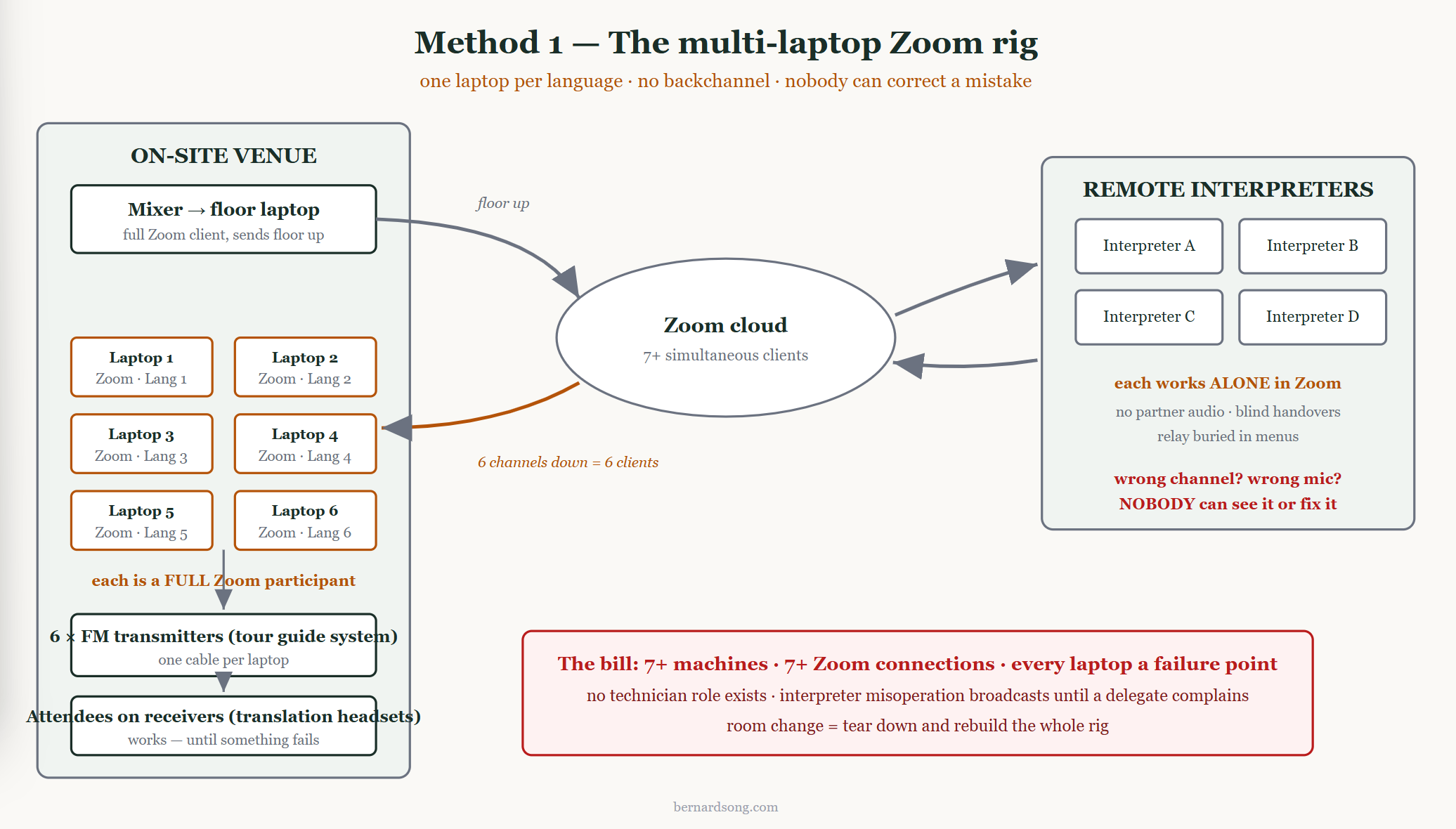
The floor goes up. One laptop at the venue joins the Zoom meeting and feeds the room's audio into it — normally a line-level output from the venue's mixing desk into a small USB audio interface, because laptop mic inputs are not designed for line level. This feed is what every remote interpreter will hear.
The interpreters work in Zoom's interpretation feature. Each is assigned a language channel and speaks into it.
The interpretation comes back down — one laptop per language channel. This is the part that surprises people. A Zoom client can only output one interpretation channel at a time, because it was designed for a human listener who has selected one language. So if you have six languages, you need six laptops onsite, each joined to the meeting as a separate participant, each with a different language selected, each cabled to its corresponding FM transmitter.
Practical notes if you are building this rig:
Where this method genuinely struggles:
Relay. Multilingual conferences run on relay — when nobody in the Chinese booth works from Arabic, the Arabic goes into English first and the Chinese interpreter takes it from there. Zoom does have a relay function, but its controls were not designed for split-second use under load. In a live multilingual regime, interpreters switch relay sources constantly, and an unintuitive control in that position is not an inconvenience; it is a source of errors that reach the audience.
Interpreters cannot see or hear each other. Booth partners normally coordinate constantly — handovers every twenty to thirty minutes, numbers passed on paper, a colleague catching a missed term. In Zoom's interpretation feature, each interpreter is alone. Over a full day, quality degrades in ways that are entirely predictable and entirely preventable.
Nobody is watching — and nobody could fix it if they were. If an interpreter lands in the wrong channel, selects the wrong microphone at system level, or their gain collapses, there is no technician role in Zoom, and no way for anyone to reach into an interpreter's setup and correct it. The error simply broadcasts until a delegate complains — by which time it has been happening for minutes. Over a long multilingual day, interpreter misoperations are not a possibility; they are a statistical certainty, and this method has no mechanism for catching them.
Physical fragility. Six to ten consumer laptops, each with a power supply, a USB dongle and a cable to a transmitter, on a table at the back of a live event. Every one is a failure point, and if the event moves between rooms — as conventions often do— the whole rig must be broken down and rebuilt.
It works. I have seen it work. But it is a rig, not a system, and the people running it usually know that.
Method 2: Bring in an RSI platform
The second common approach is to hire a remote simultaneous interpretation (RSI) platform. To be fair to these platforms: they can feed an FM or tour guide system the same way Zoom does — one laptop per language channel, each logged into the platform, each cabled to a transmitter —so delegates are not forced onto phones. But notice what that means: you have reproduced Method 1's multi-laptop rig, just on a different platform, and added a new problem on top.
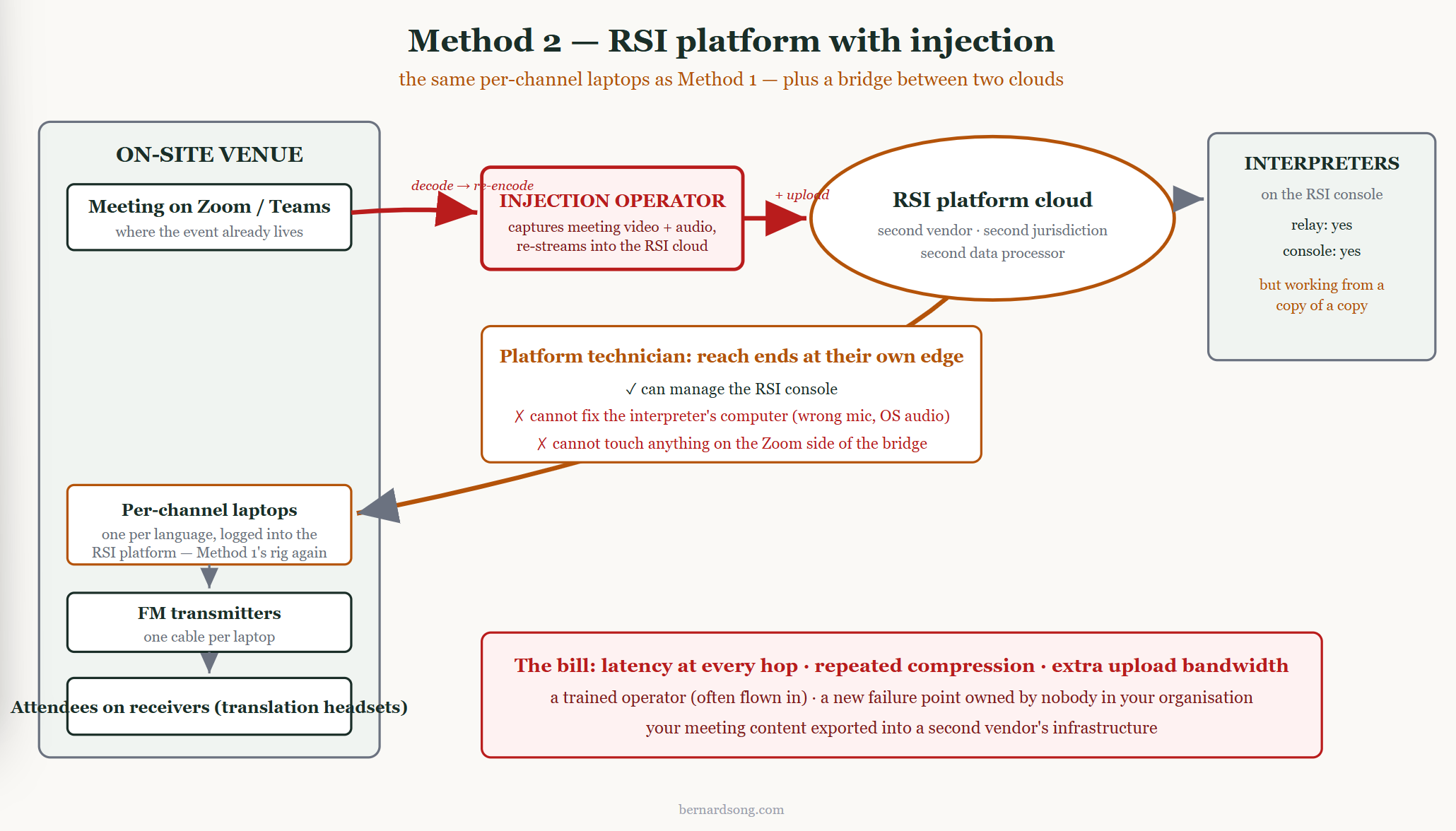
The new problem is injection. Your meeting is already happening on Zoom or Teams; the RSI platform is a second system. So an operator must capture your meeting's video and audio and re-stream them into the platform's cloud. That has four consequences worth thinking about before you sign anything:
Latency accumulates. The audio crosses your meeting platform, then the injection point, thenthe RSI platform's own pipeline, then comes back down. Each hop adds delay. In a room where delegates can see the speaker's mouth, the gap becomes obvious.
The signal is re-compressed at every hop. Zoom encodes it, the injection point decodes and re-encodes it, the RSI platform encodes it again. Interpreters work from a copy of a copy — and everything downstream inherits it.
Bandwidth goes up, not down. Injection means a continuous audio-and-video stream pushed out of the meeting into the second cloud — a load carried by the venue's connection or the operator's, on top of everything the event is already doing.
Your content leaves. Everything said in your event is exported into a second vendor's infrastructure — a second data processor, often a second jurisdiction. For corporate or institutional meetings, this is worth checking against whatever confidentiality undertakings you have given participants.
The injection point itself is a failure point, owned by nobody in your organisation. Add the operator these platforms require — usually trained, sometimes flown in — and the travel cost you removed by going remote partially returns.
One more limitation that is easy to miss: these platforms do have tchnicians, but their reach ends at their own platform's edge. They can manage their console. They cannot see or fix a misconfiguration on the interpreter's own computer — the wrong microphone selected at system level, an operating-system audio setting gone wrong — and they can do nothing at all about anything happening on the Zoom side of the injection. The layer where most real-world failures originate is precisely the layer nobody can reach.
Method 3: One laptop, audio-only, straight into the transmitters
The configuration I now use and recommend keeps the strengths of both and drops the rig.
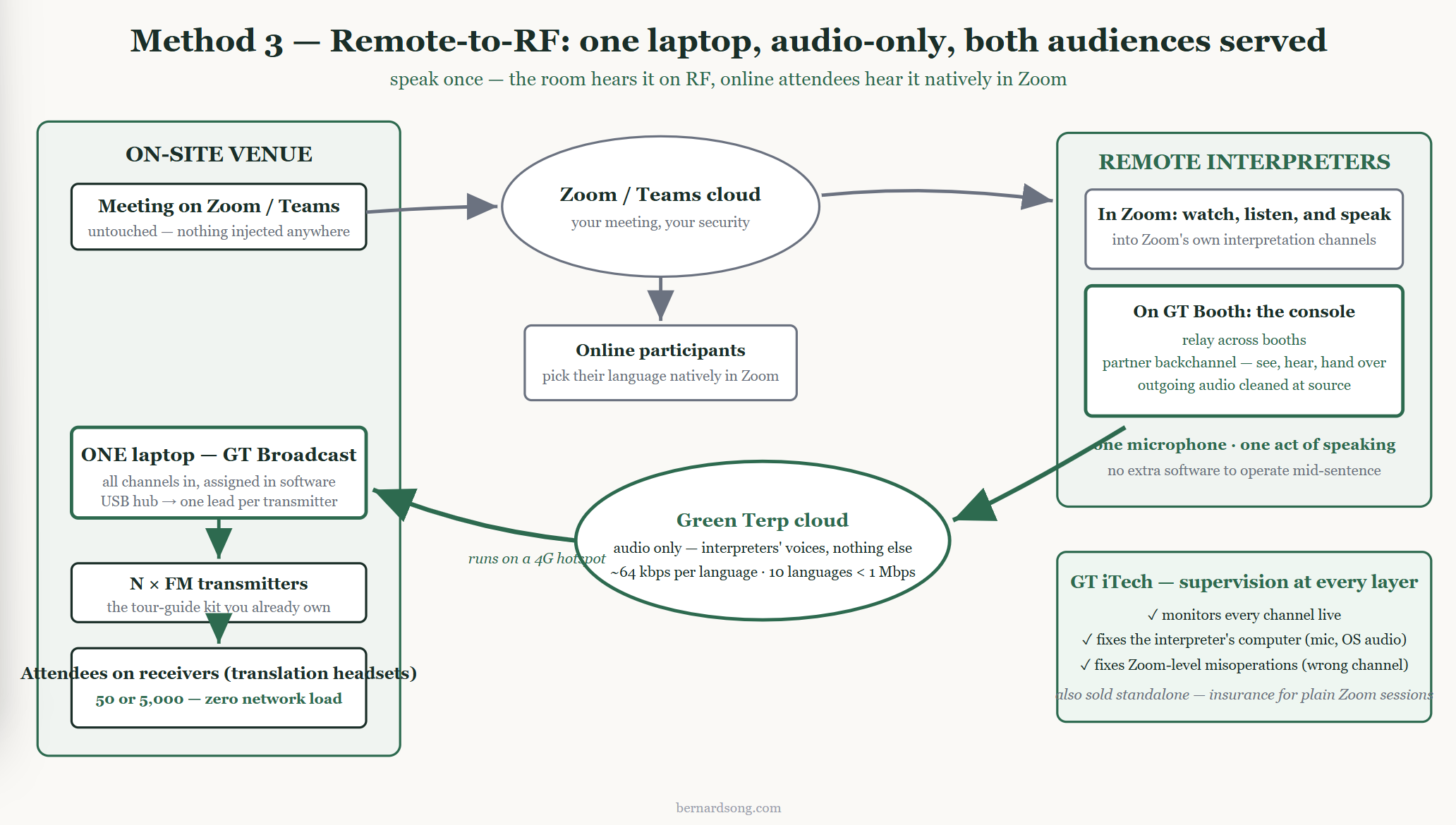
The meeting stays where it is. Interpreters join your Zoom or Teams session as ordinary participants to see and hear the room. Nothing is injected into any second platform; your meeting's own security applies.
Interpreters work on a proper interpreting console. Not the meeting client — a dedicated interpreter application with relay across booths, a partner back channel so colleagues can see, hear and coordinate handovers, and outgoing audio cleaned at the source.
One laptop on site receives all language channels. Instead of one Zoom client per language, a single application receives every interpretation channelas an audio-only stream, and assigns each channel in software to a separate USB audio output. A USB hub and a set of USB-to-3.5mm leads feed each FM transmitter directly — the tour guide system you already own, used exactly as it was designed to be used.
Online participants lose nothing. Because the meeting stays on Zoom, interpreters continue to speak into Zoom's own interpretation channels exactly as before — remote attendees select their language natively, as they always have. The interpreter speaks once; the same voice reaches the room through the receivers and the online audience through Zoom. No second microphone, no extra software to operate mid-sentence, no added cognitive load on people who are already doing the most cognitively loaded job in the building.
Someone can actually fix things — at every layer. A technician monitors all channels and, critically, can reach the places where failures actually originate: the interpreter's own computer (a wrong microphone, a system-level audio setting) and the Zoom interpretation layer (a wrong channel selection). This is the capability Method 1 lacks entirely and Method 2 has only within its own platform's walls. In my experience it is worth more than any other single feature, because interpreter misoperation over a long day is not an edge case — it is the most common failure mode there is. Green Terp offers this supervision as a standalone service (GT iTech) even for plain Zoom interpretation sessions that use nothing else of theirs — effectively an insurance policy on Method 1.
The arithmetic changes completely. Interpretation audio is roughly 64kbps per language. Ten languages is well under 1 Mbps in total — a 4G hotspot handles it. And because the receivers carry the audience, your bandwidth is fixed by the number of languages, never by the number of delegates. Fifty listeners or five thousand: identical network load.
For hybrid events that move between rooms, this matters more than thecost: one machine and a hub, rather than a table of laptops to rebuild.
This is what GT Broadcast, part of the Green Terp system, was built to do; I should disclose that I founded the company that makes it. But the architecture matters more than the brand: what you want in this configuration is audio-only return, software channel assignment to multiple outputs, and a real console for the interpreters. Ask any vendor whether they can do those three things.
Frequently asked questions
Can Zoom interpretation feed a tour guide system? Yes — but a Zoom client outputs only one interpretation channel per computer, so feeding a multi-channel tour guide or FM system from Zoom requires one laptop per language, each cabled to its transmitter. Purpose-built alternatives deliver all channels through a single laptop.
Can remote interpreters work with on-site headsets and receivers? Yes. Interpretation produced by remote interpreters can be delivered into any FM, tour guide or IR receiver system at the venue; the only question is how many computers and how much bandwidth the bridge requires, which depends on the method chosen.
How many laptops do I need to feed multiple interpretation channels? One laptop per language if you use Zoom or a conventional RSI platform directly, because each client outputs a single selected channel. One laptop in total, regardless of language count, if you use a system that assigns every channel to a separate USB audio output in software.
Do you need interpretation booths for a hybrid event? No. When interpreters work remotely, no booths are required at the venue; the space, rigging and rental cost of booths is one of the main savings of hybrid event interpretation. Interpreters do need quiet, professional working conditions wherever they are.
What is the difference between IR and FM interpretation receivers? Infrared (IR) receivers use light, cannot leak outside the room — better for confidential meetings — and offer excellent audio, but cost considerably more to hire, needline-of-sight emitters and take longer to rig. FM and tour guide receivers useradio, set up in minutes, cost far less, and pass through walls; for most conferences they are the pragmatic choice.
How much bandwidth does hybrid event interpretation need? Audio-only interpretation streams need roughly 64 kbps per language, so a ten-language event fits under 1 Mbps plus one floor feed going up — within reach of a 4G hotspot. Multi-laptop Zoom rigs need far more, because each machine is a full video meeting client.
Can we use our own tour guide system with remote interpreters? Yes. Any transmitter with a 3.5mm or line-level input can be fed from a computer's USB audio output, so equipment you or your AV partner already own works in every method described here — usually cheaper than renting anything new.
What is a silent conference system used for in interpretation? A silent conference system is the same hardware as a tour guide system — transmitters and wireless headsets — used indoors so several audio channels can run in one room without loud speakers. For interpretation, each language occupies one channel and delegates pick it on their receiver.
Can online Zoom participants still hear interpretation if the on-site audience is on receivers? Yes. In Method 3, interpreters keep speaking into Zoom's native interpretation channels while the same voice is simultaneously carried to the on-site receivers — online attendees select their language in Zoom exactly as usual, and the interpreter does nothing extra.
Can anyone fix an interpreter's mistake during a live Zoom interpretation session? Not in plain Zoom — no technician role exists, and no one can reach into an interpreter's channel selection or computer audio settings remotely. RSI platform technicians can manage their own platform but not the interpreter's operating system, and not anything on the Zoom side. Remote technical supervision covering both layers exists as a service, and for long multilingual days it is the cheapest risk reduction available.
What about latency? Some network delay is unavoidable with remote interpreters — their voices must cross the internet. What you can control is how many times the signal is re-encoded and how much video it is dragged through: audio-only return paths are materially faster than video-injected ones.
Do delegates need an app? No. That is the entire point of delivering interpretation to receivers: delegates hold a translation headset and turn adial, with no app, no login and no venue Wi-Fi involved.
If you are planning one of theseevents
The questions I would ask any provider, in this order: Can you deliver all language channels into one on-site machine? Do your interpreters have a real console with relay and a partner channel? Does anything need to be injected into a second platform? What is the total venue bandwidth requirement? And can my own team operate it, or are you sending someone?
I work as a conference interpreter and advise on multilingual event technology. If you are planning a hybrid event in this configuration and want an opinion on the setup — including a second opinion on someone else's proposal— you are welcome to get in touch.
Accredited English-Mandarin (Chinese) Consultant Conference Interpreter based in Singapore, Member of AIIC and ATA
Remote Simultaneous Interpreting (RSI) Expert
If you want me to provide you Interpretation/Translation service in English to Chinese (Mandarin) and vice versa, or a quotation for conference interpreting services of any languages, simply contact me by phone or email.
Dr. Bernard Song
Mob: (+65) 9478 0176
Tel: (+65) 6610 6718
Email: psong@BernardSong.com
© 2026. Bernard Song. All Rights Reserved.


