
We've covered the ears and the missing supervisor. This one is about your voice — and the half of your kit that was never finished.
----------------------------------------------------------------------------------------------------------------------------------
A while ago I wrote about the half of whispered interpreting nobody had named: the input. The missing volume control. The ear that turns itself down every time we speak. The floor feed we never ask for because we've been trained to believe feeds come bundled with booths.
The response taught me something I hadn't planned to learn.
A sound engineer wrote that audio teams are always happy to provide a feed — we simply don't ask. A colleague described neck pain from tilting between her client and the speaker, which turned out to be the same problem wearing a different disguise: her neck was doing the job a volume control should have been doing. And a colleague in Germany, who moved to bidule-only whispering during the pandemic and never went back, asked the question this article exists to answer:
"I needed my bidule interpretation to also reach remote listeners on Zoom — and it was tricky. Could one of those little TikTok mics be thesolution?"
No. And the reason it's no is worth an article, because it reveals theother half of everything I wrote last time.
The input piece argued that we've spent a century accepting whatever the room gives our ears. The output side is stranger: we've spent the same century carrying half a sound system and never noticing the other half was missing.
----------------------------------------------------------------------------------------------------------------------------------
A tour guide system is half a system
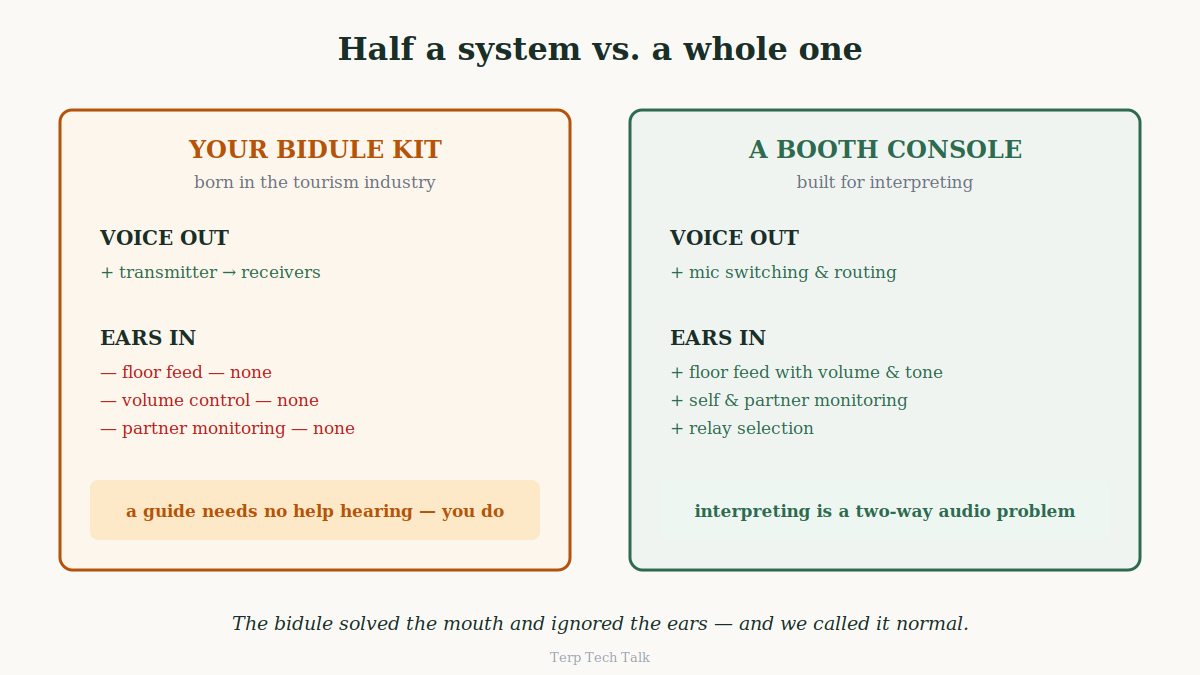
Think about what your bidule kit actually is. A transmitter and a bag of receivers. It sends your voice out. That is all it does, and all it was ever designed to do — it comes from guided tours, where the guide needs no help hearing anything.
Now think about what a booth console is. Take the classic two-channel interpreter console that has sat in booths for decades: floor audio in, with avolume knob and tone controls; your microphone out, with proper switching; monitoring of yourself and your partner; relay selection. Both directions.The console's entire reason for existing is that interpreting is a two-way audio problem: what reaches your ears determines what can leave your mouth.
The bidule solved the mouth and ignored the ears. And because it was the only mobile option, we adapted: naked-ear listening, the tilted neck, the raised voice, the loop I described last time. We treated the missing half as a law of nature.
It isn't a law of nature. It's a product-design accident from the tourism industry — and the machine that fixes it has been in your backpack all along.
The laptop was the console all along
Here is the configuration, end to end. It requires the computer you already carry, one USB audio lead, and the transmitter you already own.
Your ears. The floor comes into your laptop — from the venue's mixing desk when there is one, or from a small wireless lavalier clipped near the speaker when there isn't (the "TikTok mic" from last time; search wireless lavalier microphone with USB-C receiver). TerpMate's audio input monitor brings that feed into your headphones at a level you set. This is the volume knob our profession never had in whispered mode, and it is free — the same community edition, no subscription, no catch. The same feed drives the ASR if you use the CAI side of TerpMate, which means the transcript on your screen and the sound in your ears come from one clean source instead of the room's echo.
Your voice. Your microphone goes into the laptop, and GT Booth's built-in Broadcast feature routes it straight out through the USB lead into your bidule transmitter. Local, wired, no network in the path — the audio never leaves the machine, so the latency is whatever analog-to-digital-and-back costs, which your listeners cannot perceive. Two channels — so a boothmate plugs into the same laptop, you monitor each other properly, and handovers stop being blind. And as of this article, on a single laptop it is free (more on that below).
Your remote listeners. Once your microphone lives in the laptop, the client's meeting platform simply takes it natively, whichever platform that is. You speak once. The room hears you through the receivers; the online audience hears you through the platform they were already on. No second microphone, no acoustic double-capture, nothing extra to operate mid-sentence.
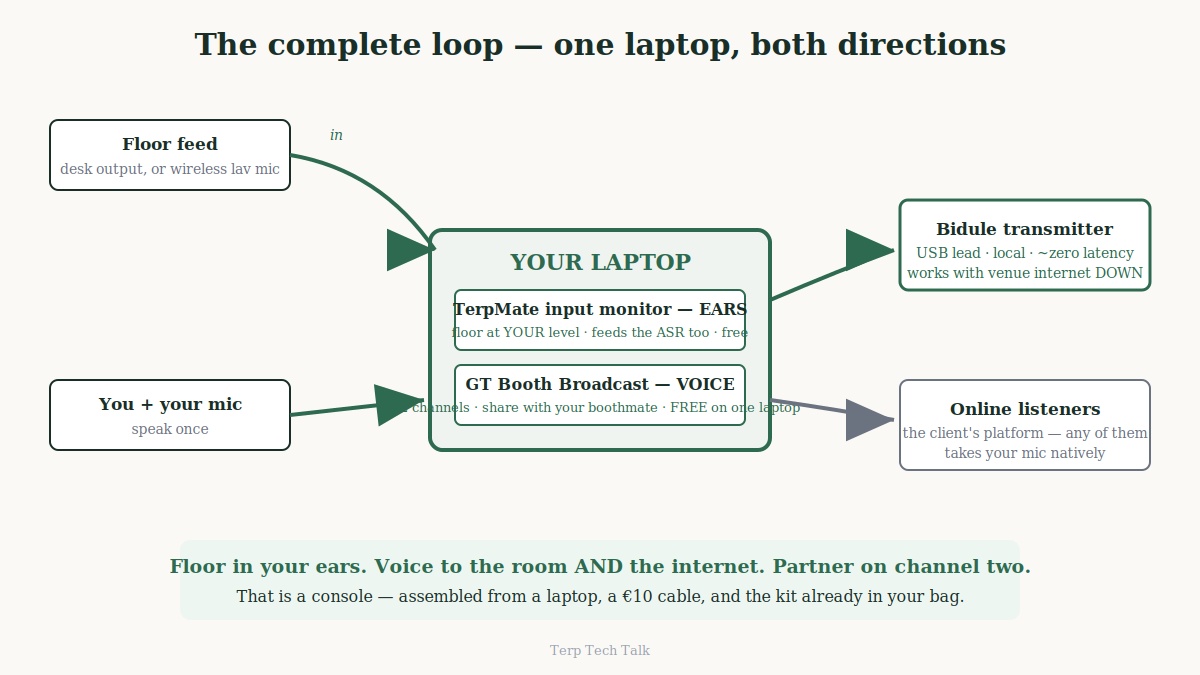
Count what just happened. Floor monitoring with level control. Microphone routing to the room. A second channel for your partner. Mutual monitoring. Delivery to remote listeners as a side effect. That is a console — assembled from a laptop, a €10 cable, and the kit already in your bag. The room pathworks with the venue internet down. The whole thing fits in a backpack and deploys in the time it takes to find a power socket.
And the ergonomics resolve themselves, exactly as the neck-pain comment predicted: with the floor in your ears and your voice on the transmitter, youstop leaning toward anyone. You just sit.
-------------------------------------------------------------------------------------------------------------------------------
"But I already plug my mic into the transmitter"
Fair objection — it's what we've all done for years, and for a solo interpreter with no floor feed and no remote listeners, it still works. Here is what changes when your voice goes through the laptop instead, in the order I'd rank them.
Handovers stop being error-prone. Let me be fair to the transmitter first: passing it to your boothmate is genuinely easy, and with one transmitter per channel there's not much to carry. The trouble is what happens under pressure. A quick switch mid-speech is a physical manoeuvre — and with two channels on the table, it's a physical manoeuvre with a wrong answer available: the wrong device grabbed, a mic still live on the one you just put down, a connector half-seated in the rush. On screen, the handover is one click on a labelled channel, with the state of every mic visible to both of you. The physical version is easy until the one time it isn't; the software version has no wrong transmitter to grab.
Your partner exists again. Speaking straight into a transmitter, you cannot hear your boothmate at all — the floor is in your ears and your colleague is inaudible. Handovers go blind; nobody catches your missed number. Shared mode restores mutual monitoring, the single biggest quality mechanism booth workever invented — and no transmitter can provide it, because it requires the two voices to meet inside a machine.
A real mute. Most bidule transmitters have no cough switch: your options are fumbling a connector — pop, broadcast — or never coughing. The reverse failure is worse: the hot mic between turns, your chat with your boothmate going out to forty delegates. Everyone has a version of that story. A visible on-screen mute ends both.
One headset at the table. Add a floor feed to the direct setup and the seated ergonomics get cluttered: headphones from the laptop on your ears, a separate mic in your hand or on a stand for the transmitter, two devices competing forthe same square foot of meeting-room table. Voice-through-laptop means one headset does ears and mouth, and your hands hold a pen. But let me draw the boundary honestly, because it runs the other way than you might expect: this isa seated configuration. GT Booth needs a laptop — it doesn't run on a phone or a tablet, whose audio systems can't do this work — so on a walking tour, the bidule alone remains exactly the right tool, unbeatable at the thing it was born for. The laptop console is for the seated majority of whispered work: the boardroom, the delegation meeting, the training room, the seated sitebriefing. Moving job: transmitter in hand. Seated job: console on table.
Your listeners get one volume. A mic straight into a transmitter hasno gain staging — your level rides with your distance from the capsule and your fatigue, and delegates spend the day riding their volume wheels. Through the laptop: proper input gain, consistent output. Delegates never touch the wheel, which is exactly how professional audio should feel.
Your voice becomes reusable. Locked inside an RF transmitter, your interpretation exists for thirty metres and then is gone. Inside the laptop, the same act of speaking reaches the room, the online audience, and a recording — twin-track, time stamped, yours, for self-assessment or the client deliverable. And it inherits everything software can ever do to audio from now on — including one thing coming that will make whispering in a shared room genuinely private for the first time, and that will only ever work through this path. The transmitteris an end point. The laptop is a platform.
------------------------------------------------------------------------------------------------------------------------------
Why this matters beyond comfort
I want to make a bigger claim, carefully.
For our whole professional history, whispered and bidule interpreting has been the degraded mode — the thing we do when the client won't pay for proper equipment. Lower audio dignity, higher fatigue, and an unspoken assumption that mobile work and quality work are different tiers.
The configuration above ends that hierarchy. A whispered assignment with a controlled feed, monitored output, and a partner channel is not booth work's poor cousin; it is the same professional standard in a smaller bag. Which changes two conversations:
The conversation with clients. When a client says "no budget for equipment," the honest answer used to be a shrug. Now it is: the equipment is a transmitter you can rent for very little — and I bring the rest. Interpreters who can deliver their own last mile are worth more per day, and can say so. Some colleagues will go further and quote the delivery as its own line, the way photographers bill for gear. That is new revenue that used to belong to nobody, because the service didn't exist.
The conversation with ourselves. We have argued for decades, correctly, that interpreters cannot render what they cannot hear — and then exempted every mobile assignment from the principle. The exemption is over. If the profession's standards mean anything, they travel in the backpack too.
----------------------------------------------------------------------------------------------------------------------------------
The €10 cable feeds the big iron too
One more thing, for colleagues who work in large halls — because it changes the scale of the claim.
Everything above sounds like a bidule story: small kit, small rooms. It isn't. The same laptop output feeds a full traditional SI installation — the Bosch-class systems with the CCU in a rack and Integrus infrared covering the hall — as long as the installation is the classic analog generation rather than a Dante-networked one, which covers most of what's actually installed in the world's conference venues.
Here is why. Those systems have always had a designated door for outside audio: the audio expander, a rack unit whose entire purpose is inserting external sources into the system. Four line inputs per unit — ordinary XLR andRCA — each assignable to an interpretation channel on the central control unit, which then hands it to the infrared transmitter and out to every receiver in the hall. When today's hybrid events bring in remote interpretation, this is exactly where the AV team wires it: one meeting-platform laptop per language, each cabled into one expander input.
Which means the big-iron version of our problem is the same problem. And the same answer: one laptop, one USB lead per channel into the expander, the per-language rig gone. To the expander, your laptop is indistinguishable from any other line-level source — except that it carries every language at once.
So the configuration in this article is not the budget alternative to a"real" SI system. It is the front end for both: the €200 transmitterin your backpack and the installed system in a plenary hall take the same cable from the same machine. The delivery hardware was never the hard part. The missing piece was always between the interpreter and the wire.
----------------------------------------------------------------------------------------------------------------------------------
What I'm not claiming
Three limits, stated plainly, because precision is the whole brand of this newsletter — and a fourth I've folded into the reasons above: this is a seated configuration, and on a moving assignment the bidule alone is still the right tool.
This is the mobile pair configuration: two channels, one laptop, no relay. A six-language conference with relay across booths is a different animal — that direction (remote teams, multi-channel delivery, the works) I've written up separately for the event producers and AV teams who build it, and I'll link it below rather than compress it here.
The paid part is not this. Here I owe you a correction that goes in the right direction for once: when this first came up in a comment thread, I described the voice-routing feature as paid. We've since made a decision — the single-laptop configuration, everything in this article, both channels, shared with your boothmate, is free, and stays free. The reasoning is a principle you're welcome to hold us to: we charge for what our infrastructure carries. This audio never touches our servers, so it costs you nothing. What's paid is scale — multi-booth sessions, relay between booths, remote delivery, cloud audiences — the places where our systems actually work for you.
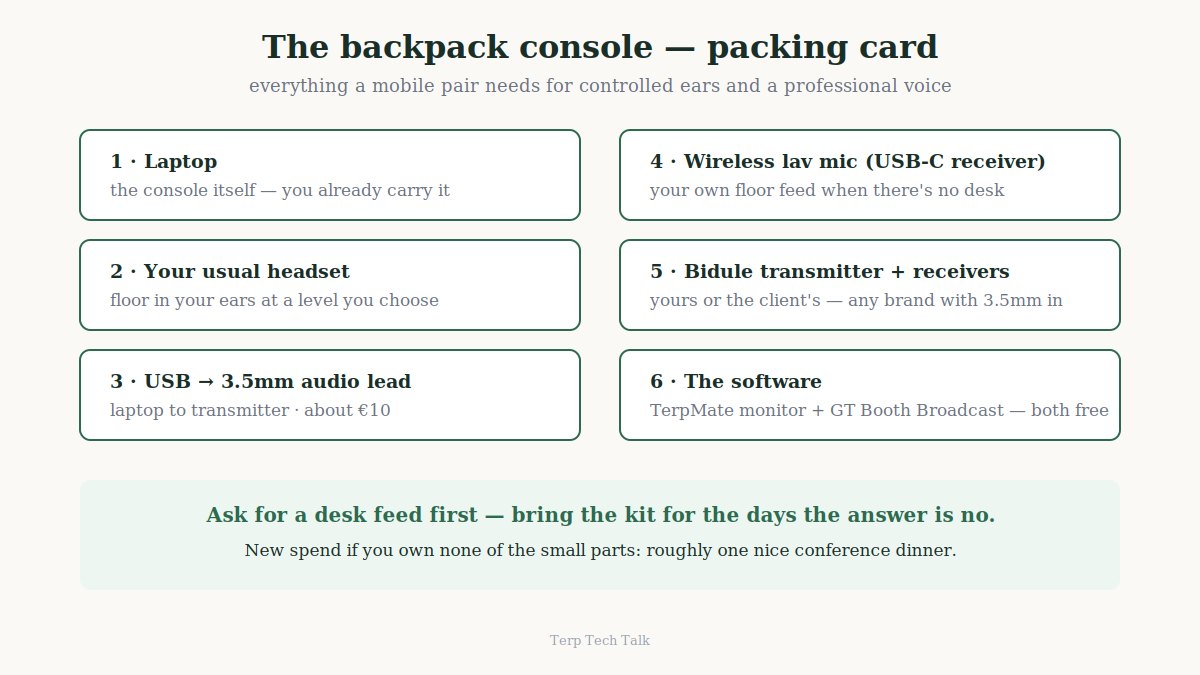
And none of this replaces asking for a feed. The desk output is still better than anything you clip to a lectern. Ask first. Bring the kit for the days the answer is no.
----------------------------------------------------------------------------------------------------------------------------------
The kit, for the road
For colleagues who asked for a packing list after last time: laptop; your usual headset; one USB-to-3.5mm audio lead into the transmitter; a wireless lavalier with USB-C receiver for rooms with no desk; the transmitter and receivers you or the client already own. Total new spend if you own none of the small parts: roughly the price of one nice conference dinner.
A century of accepting half a system, and the fix turned out to be a cable and a change of mind.
The ears came first. The missing supervisor came next. This one is thevoice — and with it, the loop finally closes: what reaches you, what leaves you, and who is watching while it happens.
----------------------------------------------------------------------------------------------------------------------------------
TerpMate's audio input monitor is free in the community edition. GTBooth's built-in Broadcast feature is free for single-laptop use, both channels— details at gtmeeting.com. For the mirror-image scenario — interpreters remote, audience in the room on receivers — the full producer's guide with all three methods is at bernardsong.com.
Accredited English-Mandarin (Chinese) Consultant Conference Interpreter based in Singapore, Member of AIIC and ATA
Remote Simultaneous Interpreting (RSI) Expert
If you want me to provide you Interpretation/Translation service in English to Chinese (Mandarin) and vice versa, or a quotation for conference interpreting services of any languages, simply contact me by phone or email.
Dr. Bernard Song
Mob: (+65) 9478 0176
Tel: (+65) 6610 6718
Email: psong@BernardSong.com
© 2026. Bernard Song. All Rights Reserved.


